Data Whimsy
  • Home
  • What is Matomo
  • Contact
  • Custom Reports
  • Connect Matomo to other software
  • CLI API etc
  • Matomo Tag Manager Simple Guide
  • Lyn Only
  • Troubleshooting + Deploying Matomo
  • Weird Data
  • Why is data in Matomo giving different numbers than Google Analytics
  • The Dashboard
  • Moving the Data
  • Book Club Forum

Simple case: In Matomo Tag Manager, just detect visits to your website

8/11/2023

0 Comments

 
Scenario:
You implemented Matomo Tag Manager but MTM is not tracking any pageviews for your site.

Using MTM is a good move. Compared to Matomo's javascript tracker, Matomo Tag Manager is more maintainable, versionable, and can inject JS into your site without you going into the server. (Caveat, in case you didn't see the word inject just now: tag managers are a security risk. Don't give access to someone casually.  An intern should probably not have User Permission to your MTM.)


So, all you want to do is start tracking your site, same as you used to with the javascript tracker.

Let's go:
  1. If you did not add a script (a tag) of Matomo Tag Manager to the HTML of your site yet, do that now. Get the script at Dashboard >> Tag Manager >> (container name) >> Install code. Take that javascript, including the (script) and (/script), and put it into your webpages. It has to be on every page you are monitoring.  If you have a site header, put it there, since the header is everywhere on your site.
  2. Dashboard >> Tag Manager
  3. New Container >> make a new container, save
  4. Variable >> New variable  (the type of variable should be "Matomo configuration")
Picture
4.  (you can accept the default values or check/uncheck. I like to enable heartbeat tracker for example)
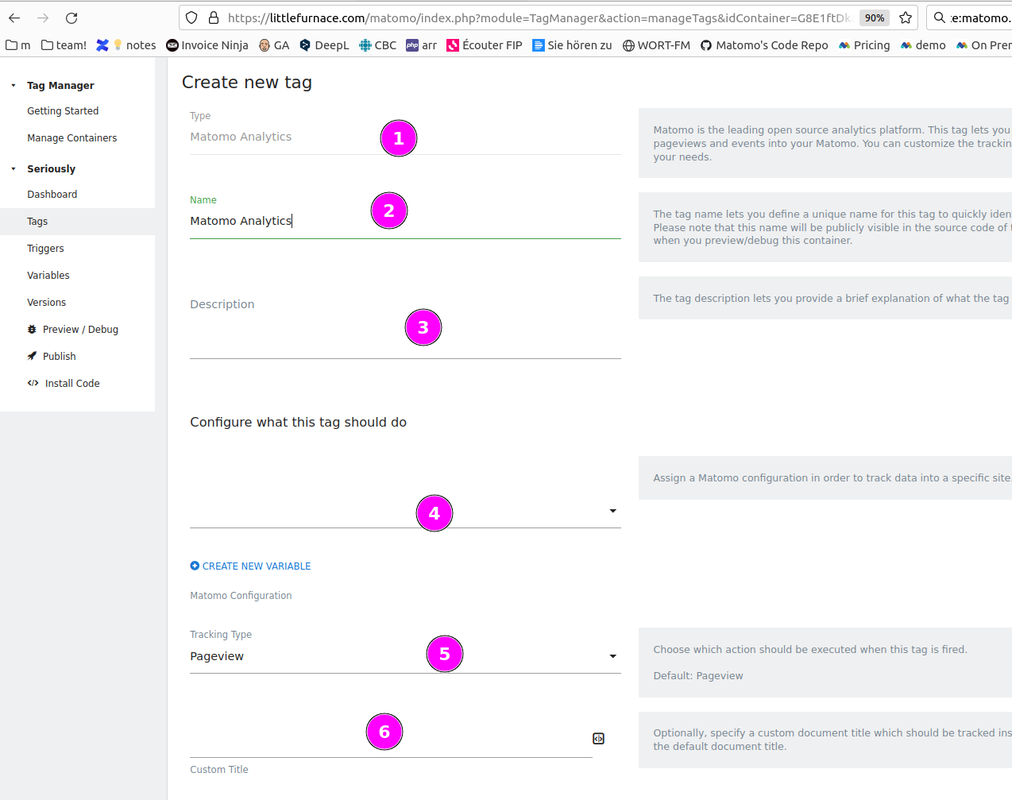
5. New Tag >> Analytics >> Matomo Analytics
Picture
4. Set these :
  1. leave as is
  2. leave as is
  3. doesn't matter, name it something useful to remember
  4. Choose "Matomo Configuration"
  5. Leave as Page View if you are removing the default tracking code (you will need something to track page views)
  6. Leave blank
  7. Easy to forget the last step:  PUBLISH!
  8. Remove the Javascript tracker from your website. If you don't, it will cause double the number of pageviews (redundant pageviews)
Picture

Okay, now check your HTML. Is it how you want it?

Here is the normal Javascript Tracker that most people have on their page when they start using Matomo.
Picture
Here is the script which connects Matomo Tag Manager.  
Picture

You don't need both! You can have both if you are careful that one is not redundantly tracking what the other is.  The main thing as a beginner is don't track pageviews in both. As a beginner, easiest solution for ensuring that is to remove one of them.
0 Comments


Leave a Reply.

    Author

    Evan Genest

    Archives

    December 2023
    September 2023
    August 2023

    Categories

    All

    RSS Feed

Powered by Create your own unique website with customizable templates.
  • Home
  • What is Matomo
  • Contact
  • Custom Reports
  • Connect Matomo to other software
  • CLI API etc
  • Matomo Tag Manager Simple Guide
  • Lyn Only
  • Troubleshooting + Deploying Matomo
  • Weird Data
  • Why is data in Matomo giving different numbers than Google Analytics
  • The Dashboard
  • Moving the Data
  • Book Club Forum